
Portable Dashboard1.4.3 - Google Play
You'll be able to see results in few seconds.
Publisher Description
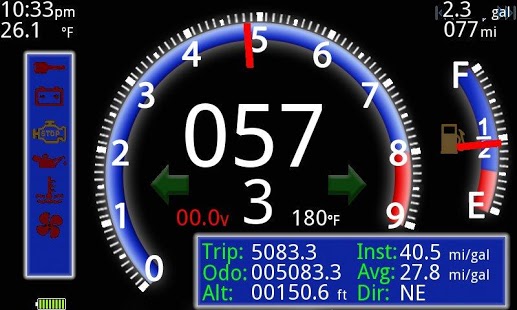
Portable Dashboard is a software application that wirelessly acquires the ECM data from the Harley Davidson Data Bus. It then decodes and displays that data in a useful way. Combined with your Android device Portable Dashboard can be used as a compliment to the existing instrumentation cluster as well as augmenting the instrumentation by providing a slew of information not available on the stock cluster.
Features Include:
* All bike data is available for display, including; indicator/warning lights, engine temp, fuel use, odometer, speed, etc.
* Additional information is computed, including; Average fuel economy, Instantaneous fuel economy, Distance until empty, trip odometer, etc.
* Diagnostic Mode providing extensive diagnostic information including; MAP sensor output, Injector Pulse Widths, Intake Air Temperature, Throttle Position, Air to Fuel Ratio and more.
* Integrated GPS providing Heading, Altitude, Velocity and Position.
* Route mapper using Google Maps.
* Trouble code retrieval and clearing as well as complete human readable trouble code lookup database.
* VIN Decoder
* DB Meter (How loud are those new pipes?)
Portable Dashboard only works with 2001-Present Delphi Equipped Harley Davidson motorcycles.
To use all the features of Portable Dashboard an ELM327 compliant Bluetooth Enabled scantool and a custom cable is required.
About Portable Dashboard
The company that develops Portable Dashboard is Codare Software Systems Inc. The latest version released by its developer is 1.4.3.
To install Portable Dashboard on your Android device, just click the green Continue To App button above to start the installation process. The app is listed on our website since 2013-09-21 and was downloaded 0 times. We have already checked if the download link is safe, however for your own protection we recommend that you scan the downloaded app with your antivirus. Your antivirus may detect the Portable Dashboard as malware as malware if the download link to com.portabledashboard.pdash is broken.
How to install Portable Dashboard on your Android device:
- Click on the Continue To App button on our website. This will redirect you to Google Play.
- Once the Portable Dashboard is shown in the Google Play listing of your Android device, you can start its download and installation. Tap on the Install button located below the search bar and to the right of the app icon.
- A pop-up window with the permissions required by Portable Dashboard will be shown. Click on Accept to continue the process.
- Portable Dashboard will be downloaded onto your device, displaying a progress. Once the download completes, the installation will start and you'll get a notification after the installation is finished.
Program Details
System requirements
Download information
Pricing
Version History
version 1.4.3
posted on 2013-09-21
version 1.4.2
posted on 2013-05-10
Several fixes and updates
Disclaimer
Official Google Play Link
We do not host Portable Dashboard on our servers. We did not scan it for viruses, adware, spyware or other type of malware. This app is hosted by Google and passed their terms and conditions to be listed there. We recommend caution when installing it.
The Google Play link for Portable Dashboard is provided to you by apps112.com without any warranties, representations or guarantees of any kind, so access it at your own risk.
If you have questions regarding this particular app contact the publisher directly. For questions about the functionalities of apps112.com contact us.
